I recommend reading the CLR: Exception Handling post before continuing.
A WPF application provides additional events for processing unhandled exceptions in additional to those already offered by the CLR via the AppDomain. To see this we will create a simple application that adds a Button to the main form and throws an exception when it is pressed. Here is the code added to the to the application code-behind file so we can see which events are fired and in what order.
    public partial class App : Application
    {
        public App()
        {
            AppDomain.CurrentDomain.FirstChanceException +=
                new EventHandler(FirstChance);

            AppDomain.CurrentDomain.UnhandledException +=
                new UnhandledExceptionEventHandler(Unhandled);

            this.DispatcherUnhandledException +=
                new DispatcherUnhandledExceptionEventHandler(AppUnhandled);

            this.Dispatcher.UnhandledException +=
                new DispatcherUnhandledExceptionEventHandler(DispUnhandled);

            this.Dispatcher.UnhandledExceptionFilter +=
                new DispatcherUnhandledExceptionFilterEventHandler(DispFilter);
        }

        static void FirstChance(object sender, FirstChanceExceptionEventArgs e)
        {
            Console.WriteLine("AppDomain.FirstChanceException");
        }

        static void Unhandled(object sender, UnhandledExceptionEventArgs e)
        {
            Console.WriteLine("AppDomain.UnhandledException");
        }

        static void AppUnhandled(object sender, DispatcherUnhandledExceptionEventArgs e)
        {
            Console.WriteLine("Application.UnhandledException");
        }

        static void DispUnhandled(object sender, DispatcherUnhandledExceptionEventArgs e)
        {
            Console.WriteLine("Dispatcher.UnhandledException");
        }

        static void DispFilter(object sender, DispatcherUnhandledExceptionFilterEventArgs e)
        {
            Console.WriteLine("Dispatcher.UnhandledExceptionFilter");
        }
    }
The XAML for adding a Button and the Click event handler that throws an exception is too trivial to bother listing here. When our example is run we get the following.
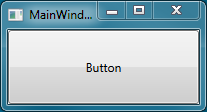
Pressing the button gives the following message.
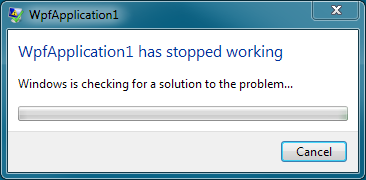
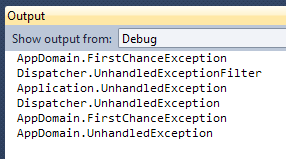
MSDN documentation indicates that the user should be given a dialog box with exception details followed by the application exiting. I have never seen the supposed dialog box appear but as we can see above it certainly does terminate. This is actually the same end result as occurs when using a bare console application but we do get some additional events. The sequence of events generated is as follows.
Dispatcher Exception Handling
A dispatcher in WPF is responsible for managing a queue of messages for a thread and dispatching them in priority order. Each WPF thread has an associated dispatcher and has two events relating to exception handling.
The first is UnhandledExceptionFilter which has the sole purpose of allowing you to decide if the exception event of the Dispatcher and Application should fire. It does not however prevent the exception from propagating to the default application domain and terminating the application. If you have some standard logic inside the dispatcher/application instances and for some reason you want to avoid it being called you could handle this event.
When the filter does not prevent it the Dispatcher.UnhandledException event is fired. This allows you to handle the event on a per-thread basis as each thread has its own dispatcher instance. An interesting feature of this event is ability to set the exception as handled and so prevent the application from terminating.
Application Exception Handling
The application instance has the DispatcherUnhandledException event which acts as a central point for any such exception occurring no matter which dispatcher it originated from. So if you have multiple threads and each has its own dispatcher you can choose to hook into the application event and know it will fire no matter which thread the exception originated on. It also has an event argument called Handled that can be used to prevent the exception propagating to the app domain and so exiting the program.
Additional Resources
MSDN – Dispatcher.UnhandledEvent
MSDN – Dispatcher.UnhandledEventFilter
MSDN – Application.DispatcherUnhandledEvent
 First Chance Exception
Hi, good post. I just noticed a syntax error. The AppDomain.FirstChanceException is of type EventHandler but in code there is written EventHandler at line 6.
…and the same bug appears in my own comment, so maybe HTML escaping characters are required: EventHandler<FirstChanceExceptionEventArgs>
Yep. < and > have resolved the issue 🙂