FirstChanceException
Introduced in .NET 4, this notification is fired by an application domain whenever any exception is thrown. Note that this notification does not allow you to alter the exception details or allow it to be marked as handled. After your event handler is processed the exception handled by the CLR in the usual way. But this is a great event for logging all exceptions that occur in your application. Given the copious amounts of output it will produce I would recommend you have a way to turn it on and off as needed.
UnhandledException
This event is fired by the application domain when an exception has been thrown but not caught. When this occurs on your default domain, the once created to host your application, it will terminate immediately afterwards. This is the place to log the exception, provide feedback to the user and then perform necessary cleanup, such as flushing file buffers. All your applications should hook this event and at a minimum log the exception. The next time a user complains your program crashed you can then at least find out the cause of the exception.
Here is a trivial example showing how to hook the events.
class Program
{
    static void Main()
    {
        AppDomain.CurrentDomain.FirstChanceException +=
            new EventHandler(FirstChance);

        AppDomain.CurrentDomain.UnhandledException +=
            new UnhandledExceptionEventHandler(Unhandled);

        throw new ApplicationException("Main Thrown Exception");
    }

    static void FirstChance(object sender, FirstChanceExceptionEventArgs e)
    {
        Console.WriteLine("FirstChanceException Handler");
    }

    static void Unhandled(object sender, UnhandledExceptionEventArgs e)
    {
        Console.WriteLine("UnhandledException Handler");
    }
}
And the console output with the interesting parts in yellow.

Nested Application Domains
The majority of applications have a single application domain that is automatically created at start-up and hosts your assembly. If you have additional domains then the firing of events becomes a little more complicated, but not by much. To see how this works we will create an example where the default domain creates a nested domain called Nested1 which itself has another nested domain called Nested2.
public class Program
{
    static void Main()
    {
        Program.HookFirstChanceException();
        Test t = Program.CreateTestInsideAppDomain("Nested1");
        t.SetupNested1();
        t.ThrowException();
    }

    public static Test CreateTestInsideAppDomain(string appDomainName)
    {
        AppDomain nested = AppDomain.CreateDomain(appDomainName);
        string executingName = Assembly.GetExecutingAssembly().FullName;
        return (Test)nested.CreateInstanceAndUnwrap(executingName, "Test");
    }

    public static void HookFirstChanceException()
    {
        AppDomain.CurrentDomain.FirstChanceException +=
            new EventHandler(FirstChance);
    }

    public static void FirstChance(object sender, FirstChanceExceptionEventArgs e)
    {
        Console.WriteLine("Domain:{0} FirstChanceException Handler",
                          AppDomain.CurrentDomain.FriendlyName);
    }
}

public class Test : MarshalByRefObject
{
    private Test t;

    public void SetupNested1()
    {
        Program.HookFirstChanceException();
        t = Program.CreateTestInsideAppDomain("Nested2");
        t.SetupNested2();
    }

    public void SetupNested2()
    {
        Program.HookFirstChanceException();
    }

    public void ThrowException()
    {
        if (t != null)
            t.ThrowException();
        else
            throw new ApplicationException("Raise Exception");
    }
}
Nested FirstChanceException
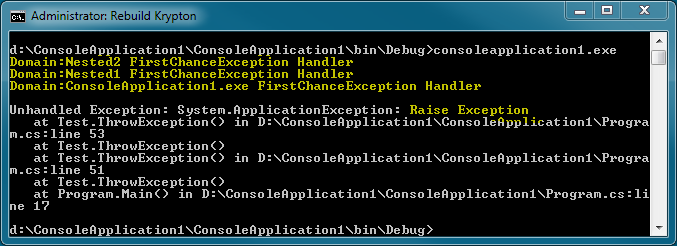
All three domains hook into the same FirstChanceException event handler and output to the console. The code is a little more complicated than our first example but this is just the extra fluff needed to create objects inside nested AppDomain instances. Line 8 causes the Test instance inside the Nested2 domain to throw an exception and gives the following output.

When the exception is thrown inside Nested2 the FirstChanceException event is fired for the Nested2 domain. Because the exception is not caught the stack is unwound one level which leaves us inside the Nested1 domain. As this is a different domain the FirstChanceException event is fired for the newly encountered domain. Again the exception is not caught so we move up another stack level and reach the Main code itself. Here the default application domain fires the FirstChanceException event because this is again a different application domain to the last one encountered.
I think this is the action you would intuitively expect to occur. The FirstChanceException event is fired each time the stack unwind encounters a different domain to the last time. As soon as any handler is found the unwinding stops and so domains higher up the stack will not be encountered and so not fire the event.
Nested UnhandledException
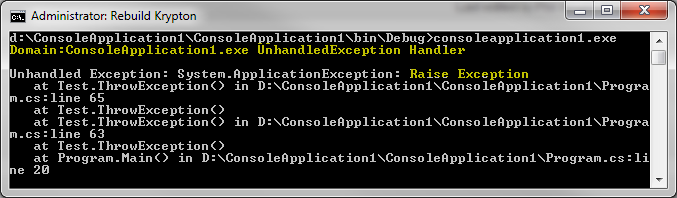
Modifying the above code to hook the UnhandledException event gives the following.

Here the UnhandledException event is fired just the once. This indicates that no method on the stack within any domain handled the exception.
Multi-Threaded Scenarios
Most applications make use multiple threads to take advantage of multi-core processors. Often you might not even realise it. The CLR garbage collector runs on a separate thread, WPF applications have a separate render thread, calling BeginInvoke on a Delegate uses a ThreadPool Thread for executing the method asynchronously.
Our new test is little more complicated, it throws an exception from a separate thread whilst nesting calls inside different application domains. This scenario is more complicated than the majority of real world applications but as multi-threaded programming becomes more common it is important to understand it.
public class Program
{
    static void Main()
    {
        Program.HookAppDomainExceptions();
        Test t = Program.CreateTestInsideAppDomain("Nested1");
        t.SetupNested1();
    }

    public static Test CreateTestInsideAppDomain(string appDomainName)
    {
        AppDomain nested1 = AppDomain.CreateDomain(appDomainName);
        string executingName = Assembly.GetExecutingAssembly().FullName;
        return (Test)nested1.CreateInstanceAndUnwrap(executingName, "Test");
    }

    public static void HookAppDomainExceptions()
    {
        AppDomain.CurrentDomain.FirstChanceException +=
            new EventHandler(FirstChance);

        AppDomain.CurrentDomain.UnhandledException +=
            new UnhandledExceptionEventHandler(Unhandled);
    }

    public static void FirstChance(object sender, FirstChanceExceptionEventArgs e)
    {
        Console.WriteLine("Domain:{0} FirstChanceException Handler",
                          AppDomain.CurrentDomain.FriendlyName);
    }

    public static void Unhandled(object sender, UnhandledExceptionEventArgs e)
    {
        Console.WriteLine("Domain:{0} UnhandledException Handler",
                          AppDomain.CurrentDomain.FriendlyName);
    }
}

public class Test : MarshalByRefObject
{
    private delegate void Nothing();

    public void SetupNested1()
    {
        Program.HookAppDomainExceptions();
        Test t = Program.CreateTestInsideAppDomain("Nested2");
        t.SetupNested2();
    }

    public void SetupNested2()
    {
        Program.HookAppDomainExceptions();
        var thread = new Thread(new ThreadStart(ThreadMain));
        thread.Start();
    }

    static void ThreadMain()
    {
        Test t = Program.CreateTestInsideAppDomain("Nested3");
        t.SetupNested3();
    }

    public void SetupNested3()
    {
        Program.HookAppDomainExceptions();
        Test t = Program.CreateTestInsideAppDomain("Nested4");
        t.ThrowException();
    }

    public void ThrowException()
    {
        Program.HookAppDomainExceptions();
        throw new ApplicationException("Raise Exception");
    }
}
And the console output with the interesting parts in yellow.

Multi-Threaded FirstChanceException
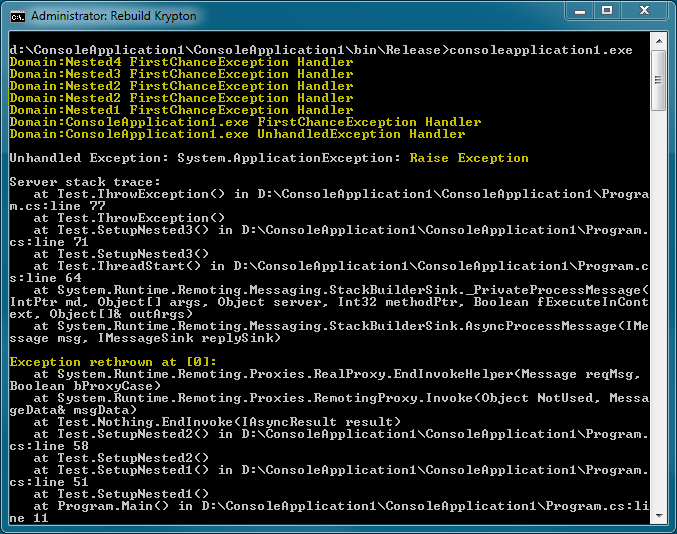
If you look at the output we can see that the FirstChanceException is thrown for each of the nested domains up to and including Nested2. As this is the domain that creates the separate thread this makes sense. You cannot unwind the stack any further than the start of the thread and the thread was created inside Nested2. This is simple and consistent with the previous examples.
Multi-Threaded UnhandledException
We actually have the UnhandledException fired twice. Once for the domain that contains the terminating thread and then for the default domain. It we had not created any extra domains then only the default domain would have fired. It is only because the extra thread terminated inside a different domain that it fired the UnhandledException event for Nested2.
Asynchronous Delegates
Using BeginInvoke on a delegate allows the delegate to be executed in a separate thread so that your main thread can continue. The CLR implements this by using a Thread from the ThreadPool. We can test this alternate way of generating another thread by replacing the SetupNested2 method with the following code.
    public void SetupNested2()
    {
        Program.HookAppDomainExceptions();
        var start = new Nothing(ThreadStart);
        start.EndInvoke(start.BeginInvoke(null, null));
    }
Note that you have to call EndInvoke to match the original BeginInvoke. There are different ways of synchronising, such as using a wait event or a callback that is fired on completion. But they all produce the same result which can be seen here with the interesting bits highlighted in yellow.

Notice that the FirstChanceException event is fired twice for the Nested2 domain. We can see why by looking at the yellow highlight towards the bottom of the output. The original exception has been rethrown by the EndInvoke. Effectively what we have here is an attempt by the EndInvoke to make the exception look as if it occurred in the original thread and not in the actual ThreadPool Thread.
The rethrow causes that duplicate FirstChanceException event for the Nested2 domain. As the rethrow is now unwinding the original thread, it fires the FirstChanceException for the rest of the domains up to and including the default domain. It also fires the UnhandledException just the once for the default domain. The ThreadPool Thread handled the original exception so that it could be rethrown by EndInvoke and so there is no UnhandledException event for the Nested2 domain, which we encountered in the last test.
You should now be confident handling exceptions in:-
- Single and multi-threaded applications
- Single and multi-application domain scenarios
- Using managed threads directly and via BeginInvoke
Additional Resources
MSDN – AppDomain.FirstChanceException
MSDN – AppDomain.UnhandledException
MSDN – Exceptions in Managed Threads



 First Chance Exception